

Scrollodex
Your meeting photo lists, as one directory that remembers who you’ve met.
Free. Runs entirely on your computer. Nothing is uploaded.
Requires a Mac with Apple silicon (M1 or later) and macOS 11 or later
Windows 10 or later. Signed by Kumonami LLC. If Windows says “Windows protected your PC,” click More info, then Run anyway
A folder or inbox of PDFs becomes one directory
Every meeting comes with a photo list. A few meetings later, you have an inbox full of PDFs and no easy way to answer “Where did I meet her?” or “Who was he with?”
Drop the photo lists onto Scrollodex. You get one Excel workbook updated with each new drop.
-
One row per person, with duplicates combined and the newest details kept. Shows how many meetings they've attended, and when you first and last saw them.
-
Every person at every meeting, newest first.
-
Who moved firms, changed titles or switched email addresses between meetings.
-
Possible duplicates flagged for you to decide. Nothing is merged on a guess.
-
Everyone’s headshot from the photo lists, right next to their name.
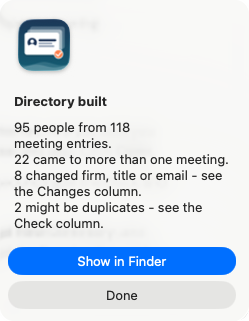
What you see after building a directory from a handful of meetings.
Private by design
Your contacts never leave your computer. Scrollodex has no account, no cloud, and no AI service. It works with the WiFi off.
Safe to install. Scrollodex is signed by Kumonami and notarized by Apple. The first time you open it, your Mac confirms that Apple checked it for malicious software.
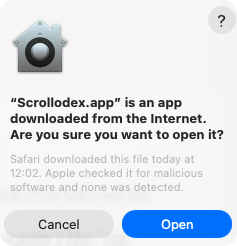
What your Mac shows the first time.
How it works
STEP 1
Drop
Drop photo list PDFs on the Scrollodex icon.
STEP 2
Choose
Build a new directory, or add to one you already have.
STEP 3
Open
Open your directory in Excel, Numbers, or Sheets.
Install on MacOS
Click Download for Mac.
Open Scrollodex-Mac.dmg from your Downloads folder.
In the Scrollodex Installer window, drag Scrollodex onto the Applications folder.
Open Scrollodex from Applications. When your Mac asks “Are you sure you want to open it?”, click Open. It only asks the first time.
Install on Windows
Click Download for Windows.
Open Scrollodex-Setup.exe from your Downloads folder.
If Windows says “Windows protected your PC”, click More info, then Run anyway. It only asks the first time.
Accept the license, then click Install. No admin password is needed.
Open Scrollodex from the Start menu or your desktop.
Questions
-
Yes. No account, no trial, no catch.
-
No. It only reads the files you choose, on your computer. Nothing is uploaded, and Kumonami never sees them.
-
Version 1.x reads one widely used photo list layout. If yours doesn't come through cleanly, send it over. That's how version 2.0 is being built: any structured roster (PDF, Word or spreadsheet), still entirely on your computer.
-
Yes. Add notes, fix a title, add your own columns. When you add the next meeting, your changes are kept, and the previous version is saved as a backup.
-
Not yet. Version 1.x needs a Mac with Apple silicon (M1 or later). If you're on an Intel Mac and want it, tell me. Enough requests and it's worth building.
-
In the files you choose, on your computer. Scrollodex doesn't send anything anywhere.
-
Scrollodex is free to use under its license terms. It’s built with open-source software; the licenses are listed with each download.
https://github.com/kumonami-actual/scrollodex-releases/releases/latest -
No. It only reads the files you choose, on your computer. Nothing is uploaded, and Kumonami never sees them.
Found something it misread? Have an idea?
Send one page of the photo list that didn’t come through, or the feature you wish it had.
Built by Kumonami: your enterprise systems leader, until you hire one.
Scrollodex 1.2 · November 2026 · What's new: Windows, photos, Notes, signed installers.
License and open-source notices. Scrollodex is free to use under its license terms. It’s built with open-source software; the licenses are listed with each download.